How many keywords per page for SEO?
Updated January 23, 2026
How many keywords per page for SEO? In most cases, the best answer is simple: one primary keyword or topic per page, plus 2-4 closely related secondary keywords. A strong page can rank for far more variations than that, but your intentional optimization should stay focused on a single intent cluster. If two terms lead to meaningfully different search results or require different stages of the buyer journey, they belong on separate pages.
How many keywords a page should target for modern SEO
Forget the old days of keyword stuffing. Modern search engines reward pages that satisfy intent, not pages that repeat the same phrase most often. Google has repeatedly explained that its systems are built to understand language in context, including the relationships between words and concepts, rather than relying on exact-match repetition alone, as outlined in its guide to how Search works with language. In practice, that means a page should be built around one clear topic and expanded with natural supporting language that helps the reader. For a practical outside view of improving rankings without stuffing, see this guide on how to improve Google search rankings.
I find many page briefs go wrong when they start with a spreadsheet of dozens of phrases and try to force them into one URL. The better approach is to decide what the page is trying to accomplish, then choose a tight keyword set that matches that single job.
Why topical depth beats keyword density for SEO ranking
Keyword density used to dominate SEO advice, but it is no longer a useful target metric by itself. Pages rank because they cover a topic well, answer the right questions, and align with the intent Google sees behind a query. That is why a well-built page can rank for many related terms even when some of them appear rarely or not at all in exact-match form.
I still check for obvious underuse or overuse during audits, but I do not optimize toward a magic percentage. If copy sounds forced, headings feel stuffed, or every paragraph repeats the same phrase, the page usually performs worse, not better.
How we chose these keyword guidelines
These recommendations are based on four practical checks I use before deciding whether several keywords belong on one page:
- SERP overlap: If two keywords return mostly the same ranking pages, they can usually live together.
- Intent match: If both terms solve the same problem for the same reader, one page is usually enough.
- On-page scope: If one article can answer both queries thoroughly without becoming thin or scattered, combine them.
- Page type: A product page, comparison page, blog post, and category page can support different levels of keyword breadth.
What disqualifies combining keywords? Mixed intent is the biggest red flag. If one term implies a tutorial and another implies a product comparison, I split them. I also split when one phrase serves a beginner and the other serves a buyer near conversion, because those pages need different structure, proof, and calls to action.
This is also why there is no universal website keywords limit. The limit is practical, not technical: how many related terms can one page cover while still feeling coherent, complete, and useful?
Primary, secondary, and supporting keywords: how many should one page target?
A useful page-level framework is:
- 1 primary keyword/topic: the main intent the page is designed to satisfy
- 2-4 secondary keywords: close variations, subtopics, or adjacent questions that support that same intent
- Natural supporting terms: entities, synonyms, examples, and long-tail phrases that appear as part of covering the topic well
That recommendation lines up with long-standing expert guidance. Keyword Insights notes that a practical page strategy is one primary keyword plus a small group of supporting variations rather than a single exact-match term, as explained in its breakdown of how many SEO keywords to use. SEOptimer makes the same core point from another angle: one page may naturally rank for hundreds of keyword variations, but intentional targeting should stay tightly focused on one cluster, not dozens of unrelated phrases, in its guide on keywords per page. For another supporting perspective, Wallaroo Media also covers how many keywords a page should focus on.
What each keyword type does
Primary keyword This is the page's main target. It should define the title, H1, opening angle, and overall promise of the content.
Secondary keywords These are close variants or subtopics that belong on the same page because they share intent with the primary keyword. They often fit naturally into H2s, comparison blocks, FAQs, examples, or supporting sections.
Supporting or long-tail terms These are narrower phrases, modifiers, and semantic terms that help the page sound complete. They do not all need their own headings. Many belong in body copy, bullets, captions, and examples.
Which keywords deserve their own headings?
Use headings for secondary terms when they represent a real sub-question the reader expects answered. Do not create a heading just because a tool exported another phrase. If a term is only a wording variation, it usually belongs in the paragraph text, not as a standalone section.
A mistake I see often is treating “authority keywords” or “alternative keywords” as if they automatically need separate page targets. Usually they do not. They are better handled as related variants inside the same article unless the search results show a different intent. If the SERP for a variant is materially different, that is your signal to split it into a new page.
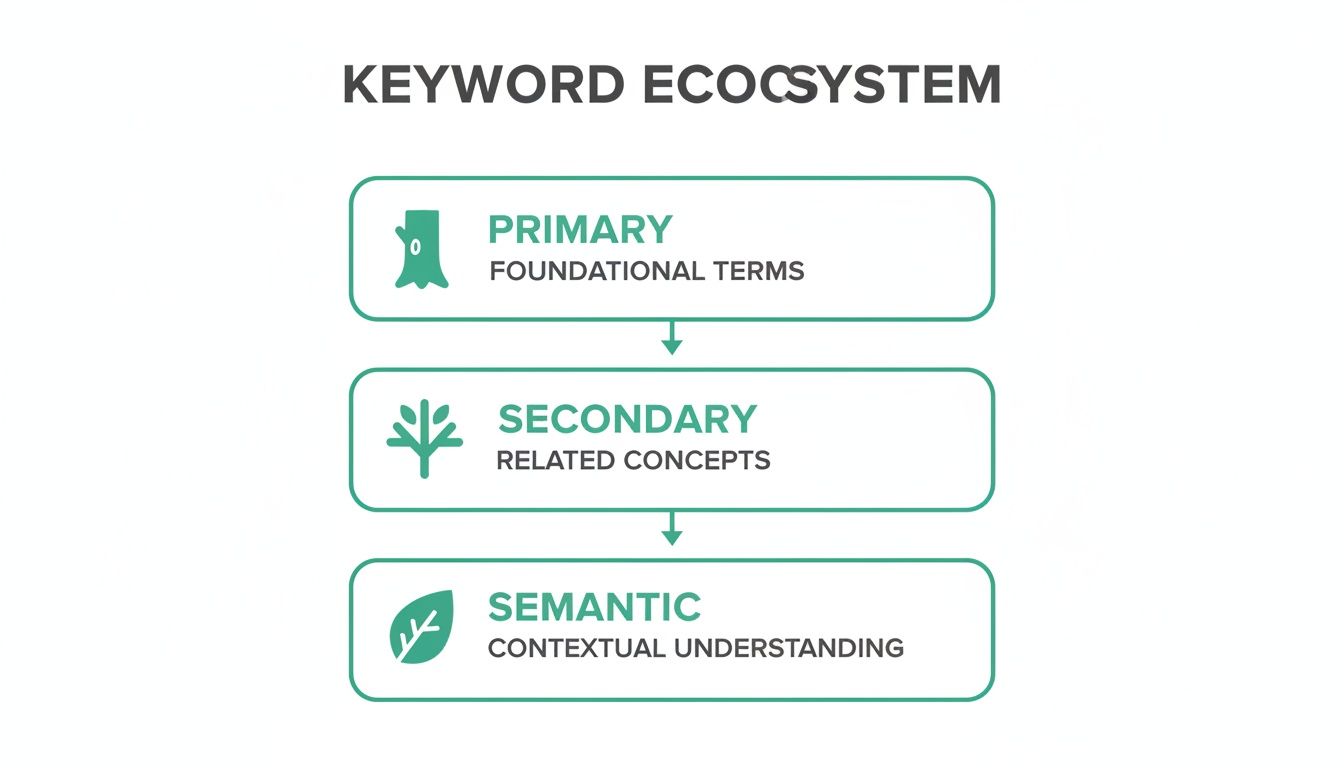
How to build your page's keyword ecosystem for better visibility
Start with a practical rule, not a metaphor: choose one page purpose, one primary topic, 2-4 secondary keywords, and then write with enough breadth that related language appears naturally. That gives search engines a clear understanding of the page while keeping the copy useful to readers.
For most pages, the workflow looks like this:
- Pick the core intent. What single question or task should this page solve?
- Choose one primary keyword. Use the clearest phrase that matches that intent.
- Add 2-4 secondary terms. These should be close variants, subtopics, or questions that belong in the same article.
- Collect supporting language. Pull in examples, entities, modifiers, and long-tail phrases from top-ranking pages, People Also Ask results, and customer language.
- Remove anything with different intent. If a keyword would require a separate angle, funnel stage, or content type, cut it from the page brief.
Tools and manual review should work together. Use research software to gather options, then validate with live SERPs and page scope. That same mindset also improves your ability to do competitive analysis in SEO, because you are comparing intent coverage rather than chasing isolated phrases.
Primary vs. secondary vs. supporting terms
A clean framework keeps the page focused:
| Keyword type | How many on one page | What it does | Best placement |
|---|---|---|---|
| Primary | 1 | Defines the page's main intent | Title, H1, intro, key on-page elements |
| Secondary | 2-4 | Expands the topic with closely related angles | H2s, H3s, comparison blocks, FAQs |
| Supporting / semantic | As needed | Adds context and completeness | Body copy, examples, image context, anchors |
Primary and secondary terms should be intentional. Supporting terms should feel earned by good writing, not jammed in because a keyword tool listed them.
Worked example: from broad topic to final keyword set
Suppose you start with the broad topic email marketing software. That is too wide for one page because it could support a product category page, a comparison article, a pricing page, or setup tutorials.
A tighter page purpose might be: help small businesses choose beginner-friendly email marketing software.
From there, the final page-level set could look like this:
- Primary keyword: best email marketing software for small business
- Secondary keywords: email marketing tools for beginners, affordable email marketing platforms, small business email automation
- Supporting terms: free trial, templates, list segmentation, deliverability, drag-and-drop builder, integrations
That set works because all of it supports the same comparison intent. But if you also wanted to target how to set up an email welcome sequence, that deserves a separate page. The user intent shifts from choosing software to learning implementation.
Deciding the optimal keyword count per page
The shortest accurate answer is this: optimize one page around one main intent cluster, not around every relevant phrase you can find. In practice, that usually means one primary keyword and 2-4 close secondary targets.
That does not mean the page will rank for only 3-5 keywords. A good page can rank for dozens or hundreds of natural variations over time. Grow and Convert makes this distinction clearly in its discussion of how many keywords to use for SEO: targeted keywords are only the planned set, while actual ranking reach is often much broader.
When one main keyword is enough
Use a single primary target with minimal secondary support when:
- the page is a product or service page with one clear commercial intent
- the keyword is already narrow and specific
- extra terms would force awkward topic expansion
- the page needs a clean conversion path more than broad informational coverage
Examples include pricing pages, branded solution pages, and location pages. In those cases, adding too many supporting targets often weakens the message.
When a page can support several closely related terms
A page can intentionally target a small set of secondary keywords when those terms:
- produce very similar SERPs
- represent sub-questions the reader expects on the page
- can be covered thoroughly without bloating the article
- all support the same stage of the journey
This is common with blog posts, comparison pages, and category guides. If I see 70-80% SERP overlap and the same top pages ranking for several variants, I am usually comfortable grouping them.
When overlap means you need separate pages
Create separate pages when:
- the SERPs differ substantially
- one query is informational and the other is transactional
- one term implies a broad guide and another implies a product list
- the content needed for one term would make the other feel rushed or off-topic
For example, “best running shoes” and “how to choose running shoes” may overlap enough to combine on some sites, but “best trail running shoes” usually deserves its own page because the buyer need is narrower and the product set changes.
Realistic ranking: what one page can rank for
A common misunderstanding is that targeting one primary keyword means one page can only rank for one phrase. In reality, pages often rank for a wide spread of variants, questions, and semantically related terms once they cover the topic well. The key distinction is between natural ranking breadth and intentional optimization scope. You may rank for 100+ terms; you should not try to optimize the page around 100 competing intents.
Warning signs that you are targeting too many keywords
Too many keywords on one page usually looks like this: mixed intents, headings written for tools instead of humans, repeated phrases that sound forced, and shallow coverage of important subtopics.
If your draft needs five different introductions to explain five different meanings, the page is overloaded. Split it.
Optimizing keyword placement for maximum impact
Placement still matters, but modern placement is about clarity, not repetition. You are helping search engines and readers understand what the page is about, how it is structured, and which subtopics are meaningfully covered. If you want another writing-focused perspective, this guide on how to write SEO articles complements the placement advice below.
Modern myth-busting: meta keywords, limits, and density
Three outdated ideas still come up constantly:
- Meta keywords do not help with Google rankings. Google has said for years that it does not use the keywords meta tag in web search ranking, as confirmed in its official post on Google does not use the keywords meta tag.
- There is no fixed website keywords limit. There is no hard cap on how many phrases a site or page may rank for. The practical limit is whether the page remains focused and helpful.
- Keyword density is not a target metric. A phrase may appear once or many times depending on topic and format. If the page reads naturally and covers the intent fully, that matters more than hitting a percentage.
I still use density as a diagnostic clue sometimes, not as a goal. Extremely low usage can signal the page never states its topic clearly. Extremely high usage usually signals stuffing. But I would never tell a writer to chase an exact percentage first.
For teams trying to understand how language understanding and AI-driven discovery are changing optimization, this overview on Busylike's site is a useful companion read.
Where to place your primary keyword
Use the primary keyword where it confirms the page's purpose:
- Title tag: Include the primary phrase or its closest natural form.
- H1: Match the page's central topic clearly.
- Introduction: Mention it early so the page promise is obvious.
- URL: Keep it concise and descriptive if you control the slug.
- One or more subheads where relevant: Only if a subtopic genuinely supports the main query.
Natural example: “How many keywords should one page target? Start with one primary topic.”
Forced example: “How many keywords per page for SEO is how many keywords per page for SEO should be used.”
The first helps. The second is obvious stuffing.
How to place secondary and supporting keywords
Secondary terms belong where they structure the answer:
- in H2s and H3s when they represent real reader questions
- in comparison tables and examples
- in image context when the image genuinely supports that subtopic
- in internal anchor text when the destination page truly matches the phrase
Supporting terms belong in body copy, examples, bullets, and definitions. They should make the writing more specific, not more repetitive.
A practical placement model looks like this:
| Element | What belongs there | What to avoid |
|---|---|---|
| Title tag | Primary topic | Multiple disconnected keywords jammed together |
| H1 | Clear restatement of page purpose | Exact-match stuffing |
| Intro | Primary topic and user promise | Repeating the same phrase several times |
| H2/H3s | Secondary questions and subtopics | Creating headings for every keyword variant |
| Image context | Descriptive file/alt surroundings and captions where relevant | Adding keywords unrelated to the image |
| Anchor text | Specific, natural descriptions | Over-optimized exact match in every link |
Understanding page structure this way also helps when planning SERP feature opportunities, because headings and supporting sections often determine whether your content is eligible for richer result types.
Measuring your keyword performance and AI search visibility
Your keyword strategy is only as good as its measurement. Rankings and traffic still matter, but they are more useful when paired with visibility data that shows whether your pages are earning attention in AI-generated search experiences too. In 2026, that means tracking both classic SEO performance and whether your content is being cited, summarized, or surfaced in AI answers.
Which metrics matter for on-page keyword success
To get a full picture of performance, track the page's primary keyword positions, total ranking keyword spread, organic clicks, and conversions tied to that URL. Then add AI visibility metrics such as answer share and brand citations to see whether the same page is becoming a trusted source beyond the standard blue links. A platform like Riff Analytics can help connect those views, and our guide to a keyword rankings and visibility report explains how to build that reporting layer.
Comparing tools for SEO and AI search tracking
The right measurement stack lets you see the full impact of your work. The table below breaks down the key metrics for comparing your performance in traditional search against your visibility in AI answers.
| Metric Type | Metric Name | What It Measures | Example Tool |
|---|---|---|---|
| Traditional SEO | Keyword Rankings | Your page's position in standard search results for a target query. | Google Search Console |
| Traditional SEO | Organic Traffic | The number of visitors arriving from non paid search results. | Google Analytics |
| AI Search Visibility | Answer Share | The percentage of AI answers where your brand or content is cited. | Riff Analytics |
| AI Search Visibility | Citation Analysis | The specific sources and context of your brand's mentions in AI responses. | Riff Analytics |
By blending these metrics, you can see whether a page is doing both jobs well: ranking for its intended keyword cluster and earning visibility in AI-driven discovery.
Summary: A modern keyword strategy for 2026 and beyond
Direct answer: for most pages, target 1 primary keyword or topic, plus 2-4 closely related secondary keywords. Then build natural semantic coverage through examples, entities, and supporting language instead of chasing density targets.
A page may rank for many more variations than that, but your optimization plan should stay centered on one intent cluster. If two terms produce meaningfully different SERPs, serve different buying stages, or require different page structures to do the job well, they should not share one article.
Frequently Asked Questions (FAQ)
How many keywords should I put on a page in 2026?
In 2026, focus on one primary keyword and 2-4 secondary keywords per page. This approach keeps the content focused on a single user intent while building enough topical depth to support broader rankings. Trying to optimize a single page for a dozen different priorities usually dilutes relevance.
Can a page rank for a keyword that isn't on it?
Absolutely. This happens frequently and proves that search engines have moved beyond simple word matching. They understand context and synonyms. A guide on "running shoes for beginners" can rank for "first pair of running sneakers" because the user intent is identical. This is topical authority in action.
How do I know if two keywords need separate pages?
The simplest test is to Google both keywords and compare the search engine results pages (SERPs). If the top ranking pages are nearly the same for both queries, Google sees the intent as identical, and you can cover both with a single, powerful article. If the results are significantly different, it's a clear signal that users are looking for distinct things, and you should create two separate pages.
How many long-tail keywords should I use per page for SEO?
Instead of a specific number, treat long-tail terms as supporting language and selective secondary targets. A few strong long-tail variations can work well as H2s or H3s when they reflect real sub-questions, but most belong naturally in the body copy where they help the page answer the topic completely.
What is the best way to track keyword performance for a single page?
Start by tracking the primary keyword's rank, the page's total ranking keyword footprint, and its organic clicks and conversions. Then add AI visibility measures such as answer share and citations. That combination shows whether the page is succeeding in both traditional SEO and newer AI search experiences.
| Element | Role in Ecosystem | Example Usage |
|---|---|---|
| Primary Keyword | The core topic or "trunk" of the page. | "best CRM for small business" |
| Secondary Keywords | Related subtopics or "branches." | "CRM for startups," "small business CRM pricing" |
| Semantic Terms | Contextual words or "leaves." | "sales funnel," "contact database," "automation" |
| Workflow Method | Description | Best For |
|---|---|---|
| Manual SERP Analysis | Manually check search results for two similar keywords. If the top ranking pages are almost identical, the intent is the same. | Teams wanting a deep, qualitative understanding of user intent for high value pages. |
| Automated Tooling | Use a tool that analyzes SERP overlap at scale, automatically grouping keywords into clusters. | Agencies or in house teams managing large websites with ambitious content calendars. |